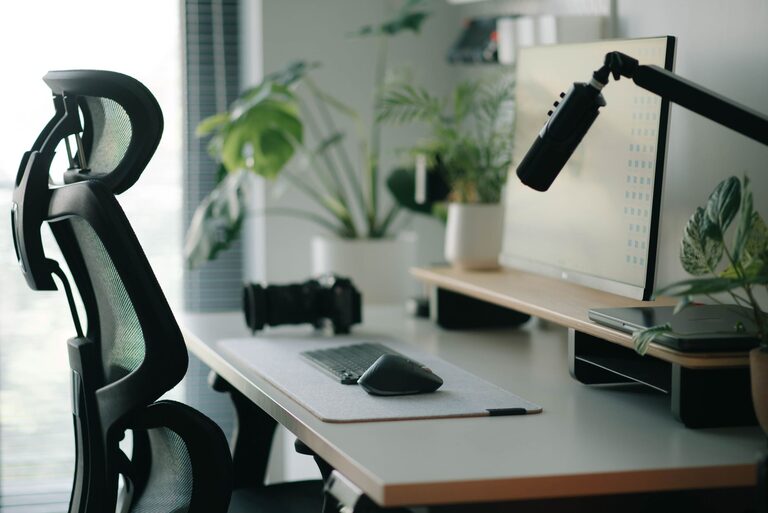
Creating a desk setup that supports both focus and comfort is essential for maintaining productivity, whether you work from home or in an office. A well-designed workspace can reduce distractions, prevent discomfort, and help you stay engaged with your tasks for longer periods. In this post, we’ll explore practical tips to optimize your desk setup for maximum efficiency and well-being.
Why Your Desk Setup Matters
Your desk is more than just a surface to hold your computer and papers. It’s a critical part of your work environment that directly affects your concentration, energy levels, and physical health. Poor ergonomics can lead to discomfort and fatigue, distracting you from your work. On the other hand, a thoughtful setup encourages good posture, reduces strain, and creates an inviting space where you feel motivated.
Choosing the Right Desk and Chair
Ergonomic Desk Options
– Height: Your desk should be at a height where your elbows can rest at a 90-degree angle when typing or using a mouse. Adjustable desks or standing desks offer flexibility for different postures throughout the day.
– Surface Area: Ensure your desk has enough room for essential items without cluttering. A clean surface helps minimize distractions.
Comfortable Chair Selection
– Support: Choose a chair with good lumbar support to maintain the natural curve of your spine.
– Adjustability: Height, armrests, and backrest tilt should be adjustable to fit your body.
– Cushioning: Opt for breathable materials and sufficient padding for all-day comfort.
Positioning Your Monitor for Eye Comfort
– Eye Level: Position your monitor so the top of the screen is at or just below eye level. This helps avoid neck strain.
– Distance: Keep the monitor about an arm’s length away to reduce eye fatigue.
– Lighting: Place the screen to avoid glare from windows or overhead lights. Using an anti-glare screen protector can be helpful.
Organizing Your Desk for Focus
Declutter Regularly
A cluttered desk can overwhelm your mind. Keep only the essentials on your desktop and find storage solutions for other items.
Use Organizational Tools
– Desk trays or drawers: Store papers and stationery to keep the surface tidy.
– Cable management: Use clips or sleeves to prevent cables from tangling.
– Pen holders and small containers: Keep frequently used items within reach.
Prioritize Items by Use
Place the items you use most often in easy reach. Less frequently needed items can be stored further away.
Incorporating Comfort Enhancements
Proper Keyboard and Mouse Placement
The keyboard and mouse should be close enough to use comfortably without reaching, ideally at the same height as your elbows.
Add a Wrist Rest
Consider a soft wrist rest to avoid strain during long typing sessions.
Include Footrests if Needed
If your feet don’t reach the floor comfortably, a footrest can improve circulation and posture.
Personalizing Your Desk Without Distraction
Adding personal touches like photos, plants, or artwork can make your workspace more inviting. Just be mindful not to add too many items that can divert your attention.
Benefits of Plants
Indoor plants improve air quality and can have a calming effect, boosting overall mood and focus.
Managing Lighting for Productivity
– Natural Light: Position your desk near windows if possible, but avoid direct sunlight on screens.
– Task Lighting: Use adjustable desk lamps to provide targeted light without causing glare.
– Ambient Lighting: Soft ambient light can reduce eye strain when working in the evening.
Tips for Maintaining Your Setup
– Take Regular Breaks: Stand up, stretch, or walk for a few minutes every hour.
– Keep It Clean: Wipe down your desk and equipment to maintain hygiene and prevent buildup of dust.
– Adjust as Needed: Reassess your setup periodically to ensure it continues to meet your comfort and focus needs.
Conclusion
A desk setup designed with both focus and comfort in mind can transform your work experience. By investing time in choosing the right furniture, organizing thoughtfully, and personalizing your space carefully, you can create an environment that supports productivity and well-being. Remember, small changes can make a big difference in how you feel and perform throughout the day. Start with these tips and tailor your workspace to fit your unique style and needs.

Related Posts